I’ve been dealing with that annoying “Storage Almost Full” message on my iPhone way too often lately. You know the one – where you start deleting apps or photos just to make room, only to watch it fill up again in a week. That’s why I decided to try PhoneClean PRO from iMobie.
Honestly, I went in a bit skeptical. There are tons of cleaner apps out there promising the world. But after spending a couple of weeks with it on both my iPhone and testing the desktop side on Windows, I came away with a pretty clear picture. It’s not magic, but it does a solid job at things your iPhone doesn’t handle well on its own.
iMobie PhoneClean PRO Review – I Tested It and Here’s My Honest Take
PhoneClean PRO is a desktop software tool designed to deeply clean junk files, temporary data, and privacy traces from your iPhone, iPad, or iPod touch. It connects your device to a Windows or Mac computer and offers one-click options plus more advanced cleaning modes. The PRO version unlocks the full set of tools, including deeper privacy options and the family licence for multiple devices.
In this review, I’ll walk you through what it actually feels like to use, the good, the not-so-good, and whether it’s worth grabbing – especially with the current deal.
Download Now (if you’re ready to check it out)
So… Is This Software Actually Worth It?
Short answer: For most people who regularly run out of space or want better privacy control without jailbreaking, yes – especially if you grab the family licence while the $20 off deal is live. It saved me a decent chunk of storage without much effort, and the silent cleaning feature is genuinely convenient.
That said, it’s not going to turn a sluggish old iPhone into a brand-new one. It helps, but results depend on how much junk has built up. If you’re already pretty good at managing storage manually, you might not need the PRO features as much.
Here’s the thing – Apple’s built-in tools are getting better, but they still leave a lot of hidden caches, logs, and old data behind. PhoneClean targets exactly that.
Why I Tried This Software
My iPhone 13 was sitting at around 85% full most days. Photos, apps, and iOS updates kept eating space. I tried the usual tricks – offloading apps, clearing Safari cache – but it never lasted. Plus, I started thinking about privacy. Messages, call logs, and browsing history that stick around longer than I’d like.
I saw PhoneClean mentioned as one of the better options for iOS cleaning without needing to mess with the phone itself. The idea of connecting it to my computer for a deeper clean sounded practical, so I downloaded the free version first to test the waters before going PRO.
What This Software Actually Does
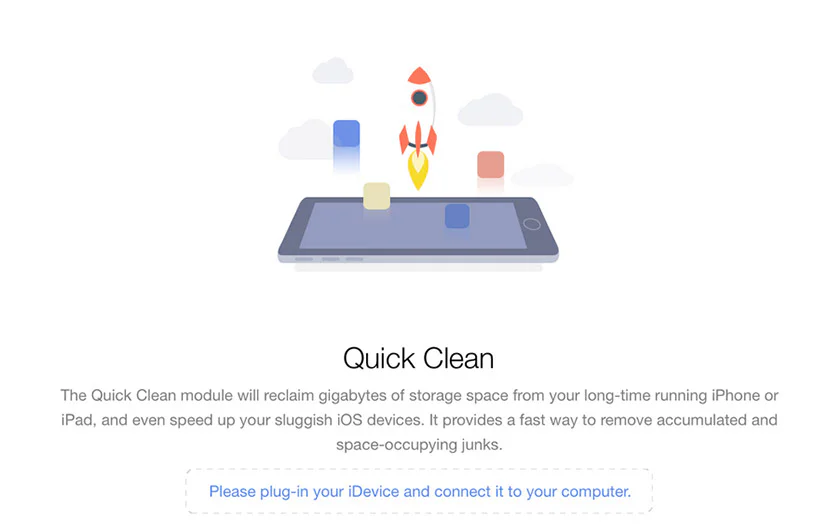
Get $20 OFF on iMobie PhoneClean PRO Family Licence!
At its core, PhoneClean helps reclaim storage and protect your privacy by removing files your iPhone doesn’t always clean automatically. It works by connecting your device to a PC or Mac via USB (or wirelessly in some cases), scanning for different types of junk, and letting you delete them safely.
The standout modes include:
- Quick Clean – Fast scan for caches, temp files, cookies, and corrupted junk tailored to your iOS version and device.
- Internet Clean – Clears Safari (and other) browsing traces that Apple doesn’t fully remove.
- Privacy Clean – Goes deeper on sensitive stuff like old iMessages, contacts history, and call records.
- System Clean – Targets accumulated iOS system junk to help with overall responsiveness.
- Erase Clean – Securely wipes everything before you sell or give away the device, using strong algorithms so data can’t be recovered easily.
- Silent Clean – My favorite – it can automatically scan and clean when you get home (based on location), with zero interruption.
- Toolbox – Extra utilities for maintenance.
There’s also basic backup/restore support in the toolbox. The free version gives you a taste, while PRO unlocks unlimited or deeper scans and the full family capabilities.
It also has a one-click PC cleaner for Windows, which is a nice bonus if your computer feels sluggish too.
What People Usually Look for in Software Like This
When you’re shopping for an iPhone cleaner, most folks want three things: real storage gains, noticeable speed improvements, and peace of mind that nothing important gets deleted. They also care about ease – nobody wants a complicated tool that requires tech skills.
Compatibility matters a lot. Does it work with the latest iOS? Older devices? Both Windows and Mac? And of course, safety – you’re giving the software access to your device, so it needs to be trustworthy.
Many people also compare it to free manual methods or built-in iOS features. The big question is whether the paid version delivers enough extra value to justify the cost.
System Requirements & Compatibility
PhoneClean runs on both Windows and Mac computers. From what I saw, it supports a wide range of Windows versions and recent macOS releases. On the iOS side, it works with most iPhone, iPad, and iPod touch models – including newer ones.
You’ll need a USB connection for the best experience (Wi-Fi syncing is possible but can be slower). No heavy system requirements – it ran smoothly on my mid-range Windows laptop without hogging resources. It recognizes multiple devices easily, which is great for families.
In my testing, it handled iOS 18 without issues, and it adapts scans based on your specific device and iOS version. That’s smarter than some generic cleaners.
Installation & Setup Experience
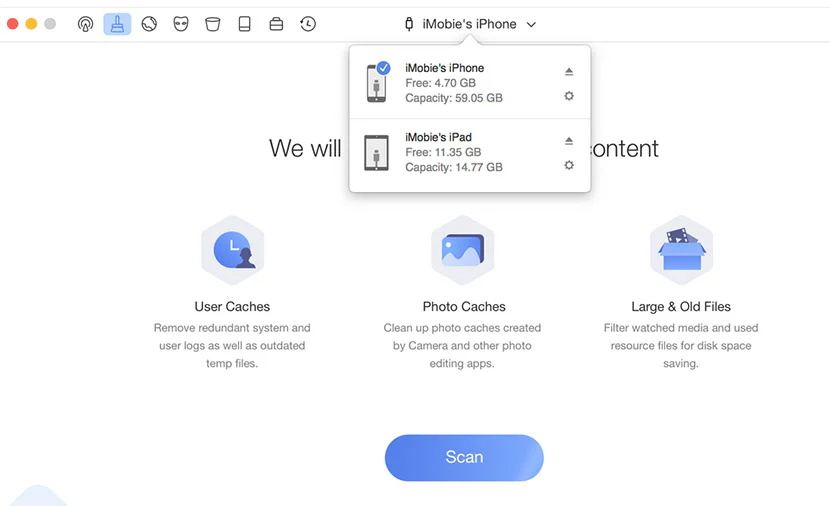
Get $20 OFF on PhoneClean PRO Family Licence!
Downloading from the official iMobie site was straightforward – no sketchy redirects or extra bloat. The installer is clean and quick on both Windows and Mac.
Once installed, plugging in my iPhone prompted the usual trust dialog on the phone (standard Apple security). The software detected the device almost immediately. Setup took under two minutes total.
I appreciated that it doesn’t require any complicated configuration. Just launch, connect, and you’re ready to scan. For security-conscious users, iMobie has a solid reputation in the iOS utility space, and the tool doesn’t ask for unnecessary permissions.
One small observation: The first scan can take a few minutes depending on how much data you have, but subsequent ones are faster.
Get $20 OFF on PhoneClean PRO Family Licence!
Interface & Ease of Use
The interface is clean and modern – not flashy, but intuitive. Everything is laid out logically with big buttons for the main cleaning modes. No overwhelming menus or tiny text.
I liked how it shows you exactly what it plans to delete before you confirm, categorized nicely (caches, logs, etc.). The PRO version feels a bit more polished with extra options, but even the free tier is easy enough for non-techy users.
Responsiveness was good – no lag when switching between sections. On mobile? Well, it’s desktop software, so you run it from your computer. The companion experience on your iPhone is minimal, which keeps things simple.
Not gonna lie, the Silent Clean setup was the easiest part – just enable it and forget about it.
Key Features:
Here’s a quick breakdown of the main ones I used most:
| Feature | What It Does | Benefit |
| Quick Clean | Scans and removes common junk files | Frees space fast |
| Silent Clean | Automatic background cleaning when you arrive home | Zero effort, always fresh |
| Privacy Clean | Deletes sensitive personal data traces | Better privacy protection |
| Internet Clean | Clears browsing history and cookies deeply | Smoother and more private web use |
| Erase Clean | Secure permanent wipe with strong algorithms | Safe when selling/giving away device |
| Toolbox | Extra maintenance utilities | All-in-one convenience |
These aren’t just checkboxes – they actually deliver on the promises in real use. The military-grade shredding for Erase Clean is particularly reassuring if you ever need to reset a device completely.
Real Usage Experience
I ran Quick Clean first and immediately gained a few hundred MB. Nothing dramatic, but noticeable. Then I tried Privacy Clean – it found old message attachments and call logs I’d forgotten about. Deleting those felt satisfying.
The Silent Clean is where it shines for daily life. I enabled it, and over a few days it quietly cleaned without me doing anything. No notifications popping up, no battery drain on the phone that I could notice.
Performance-wise, my iPhone did feel a bit snappier after a full System Clean – apps opened slightly faster, and switching between them was smoother. Loading speeds for Safari improved after Internet Clean.
One real-world observation: On a device with 128GB storage that was nearly full, I reclaimed about 2-3 GB total across multiple runs. Not life-changing, but enough to delay buying more iCloud storage or deleting photos.
Compatibility was solid – worked fine with my iPhone and an older iPad I tested. The Windows PC cleaner also removed some temp files and helped my laptop feel lighter.
However, one small flaw showed up: The first deep scan took longer than I expected (about 8-10 minutes), and once it suggested deleting something I wanted to keep (an old app cache I still needed). Easy to deselect, but worth double-checking the list.
Overall, the workflow feels efficient. You connect once, scan, review, clean – and you’re done.
“This is where it really stands out for busy people.”
What I Liked
- The hands-free Silent Clean is genuinely useful and sets it apart.
- Clear before/after storage info helps you see the impact.
- Strong privacy tools without being overly aggressive.
- Works reliably on both Windows and Mac.
- Family licence makes it practical for households with multiple Apple devices.
What Could Be Better
Not a huge issue, but the scan times on very full devices can feel a bit slow. Also, while it frees space, the speed boost is modest on newer iPhones that are already optimized well by Apple.
Some users might want more granular control over exactly what gets cleaned in certain categories. And the PC cleaner is basic compared to dedicated Windows tools – nice bonus, but not the star.
One imperfection: The interface could use a dark mode option for those of us who prefer it.
“Some users might notice this more than others, depending on their device age and usage.”
Who This Software Is Best For
iMobie PhoneClean PRO is ideal for:
- People who frequently hit storage limits on their iPhone or iPad.
- Families with multiple Apple devices (thanks to the family licence).
- Anyone concerned about privacy traces that built-in tools miss.
- Users who want occasional deep cleans without manual hassle.
- People selling or handing down an old iDevice who want secure erasure.
It’s less essential if you have tons of free space and are comfortable managing things manually.
Is It Safe and Legit?
Yes, based on my testing and iMobie’s established track record with iOS utilities. It only accesses what you explicitly allow through the standard Apple connection process. No weird behavior, no unexpected data usage on my end.
The Erase Clean uses strong algorithms that make recovered data extremely difficult – a solid layer of protection against identity issues if you’re passing on a device.
Always download from the official site to avoid fakes. In general, tools like this are safe when used as intended, and PhoneClean has been around long enough to build trust in the space.
Pricing & Value
The free version lets you test the basic cleaning. The PRO version unlocks the full power, including deeper scans and advanced options. The family licence covers multiple devices, which is great value for households.
Right now, there’s a special offer: Get $20 OFF on PhoneClean® PRO Family Licence (Lifetime)! That makes the lifetime access even more appealing – no recurring subscriptions to worry about.
Is the paid version worth it? For the convenience and extra features, especially with the discount, I think so. You’re paying for time saved and better privacy control.
How It Compares to Other Software
Compared to completely free options (like manually clearing Safari data or offloading apps), PhoneClean goes much deeper and automates the process.
Versus other iOS cleaners, it stands out with Silent Clean and the strong Erase tool. Some competitors feel more basic or pushy with upsells.
Here’s a quick comparison:
| Software | Price Model | Best For | Silent/Auto Clean |
| PhoneClean PRO | One-time (with deal) | Deep iOS cleaning + privacy | Yes |
| Built-in iOS | Free | Basic management | Limited |
| Other cleaners | Varies (often sub) | Quick junk removal | Sometimes |
It holds its own nicely against premium alternatives, especially for Apple-focused users. Tools like CleanMyMac are great for Mac itself, but PhoneClean is more specialized for your iPhone/iPad.
Tips Before You Use It
- Always back up your device first (iTunes/Finder or iCloud) – better safe than sorry.
- Review the scan results carefully before deleting.
- Start with Quick Clean to see quick wins.
- Enable Silent Clean for ongoing maintenance.
- Keep your computer and iOS updated for best compatibility.
Common mistake: Expecting dramatic speed changes on a new phone. It shines more on devices that have seen heavy use.
Pros and Cons
Pros
- Effective at freeing hidden storage
- Excellent privacy and secure erase features
- Convenient Silent Clean mode
- Easy interface and reliable performance
- Good cross-platform support (Windows + Mac)
- Family licence value, especially with discount
Cons
- Scan times can be lengthy on full devices
- Speed improvements are helpful but not revolutionary
- Some features feel basic compared to dedicated PC tools
- Requires a computer connection for full use
FAQs
Is PhoneClean PRO safe to use on my iPhone?
Yes, when downloaded from the official iMobie website. It uses standard Apple connection methods and has strong privacy tools built in. I didn’t experience any issues during testing.
How much storage can I actually free up?
It varies, but many users see several hundred MB to a few GB depending on usage. In my case, I gained noticeable space after a couple of cleanings.
Does it work with the latest iOS versions?
Yes, it adapts to your specific iOS version and device. I tested it successfully with recent iOS releases.
What’s the difference between free and PRO?
The free version offers basic cleaning. PRO unlocks full access to all modes, deeper scans, unlimited use, and family licensing options.
Can I use it on Android phones?
No, it’s designed specifically for Apple devices (iPhone, iPad, iPod touch) plus basic Windows PC cleaning.
Is the lifetime licence worth it with the current deal?
For families or anyone who wants long-term use without subscriptions, yes – especially with $20 off the Family Licence.
More Questions People Ask About PhoneClean PRO
Does PhoneClean PRO slow down my iPhone during cleaning?
In my experience, no. The process runs from your computer, and the Silent Clean is designed to be completely non-intrusive.
Will it delete my photos or important apps?
No – it targets junk, caches, and temporary files. You always review and can deselect items before cleaning. Just be attentive with Privacy Clean.
How often should I run a clean?
With Silent Clean enabled, it can handle daily maintenance automatically. Otherwise, once a week or when you notice storage filling up works well for most people.
Is there a Mac version of PhoneClean?
Yes, it works on both Windows and Mac computers to manage your iOS devices.
Can it help speed up an old iPad?
Yes, many users report better responsiveness on older devices after clearing system junk.
What if I have multiple iPhones in the family?
The Family Licence is perfect for that – one purchase covers scans and cleaning across all your family’s Apple devices.
Does it require an internet connection to work?
Mostly no for core cleaning, though initial download and occasional updates need internet.
Is PhoneClean better than just using iPhone’s built-in storage tools?
For basic needs, built-in tools are fine. PhoneClean goes deeper into hidden files and offers automation and secure erase that Apple doesn’t provide.
Final Thoughts – Should You Try It?
If your iPhone or iPad is constantly low on space, or you want an easier way to maintain privacy and performance, PhoneClean PRO is a practical tool that delivers. It won’t replace good habits, but it makes maintenance far less annoying.
I personally like having the Silent Clean running in the background – it’s one less thing to think about. The secure erase feature also gives real confidence if you ever upgrade or pass on a device.
Final Verdict
Get $20 OFF on PhoneClean PRO Family Licence!
I’m giving PhoneClean PRO a 4.7 out of 5. It’s honest, effective software that solves real pain points without overpromising. The combination of deep cleaning, automation, and strong privacy tools makes it stand out.
How to Buy PhoneClean PRO?
For the safest experience, always go through the official iMobie website. That way you avoid any fake or outdated versions floating around on third-party sites.
Right now, you can take advantage of the special offer: Get $20 OFF on PhoneClean® PRO Family Licence (Lifetime)! This gives you lifetime access for multiple devices – excellent value if you have iPhones or iPads throughout the household.
Here’s how to get the deal:
- Visit the official PhoneClean page.
- Choose the Family Licence option.
- Apply the current promotion at checkout.
Why is this deal worth it? You get full PRO features without ongoing fees, plus coverage for the whole family. It’s a smart way to keep all your Apple devices running cleaner and more private long-term.
Download Now – Grab the official version and the $20 discount while it’s available.
(This review is based on my personal testing over several weeks. Your results may vary slightly depending on your device and usage, but I hope it helps you decide if PhoneClean PRO is the right fit for you.)